
3 Ways Google Forms can Make Life Easier
- Methods with Meaning
- Jun 1, 2020
- 3 min read

What administrator isn’t looking for a tool that can make life easier? While large districts have ways to automate a lot of things, administrators of small schools typically have to do those things manually or not at all. It can be really tough to push towards the excellence we desire with finite capabilities and time limits, not to mention tight budgets!
That’s where the Google Suite comes in. If you’re not using it, you should seriously consider it! Google Classroom offers some great tools for your teachers (and you!). For example, by setting up a “class” for your faculty, you can push out announcements, attach important documents, and keep everyone connected.
Google Forms have even more uses. Because everything is stored in the cloud, you can access your work from anywhere, and you don’t need a particular device to do so. Plus, Forms work seamlessly with Google Sheets, so you can organize responses quickly and easily with a few formulas.
Here I’ll highlight three ways Google Forms can make your life easier.
(Note that the information I’ll share next assumes you have a school account which is more secure for your student/faculty data.)
Streamline Teacher Observations
By combining Google Forms and Google Sheets, you can quickly document classroom observations and access those notes from anywhere.
First, you can create a form with any categories you’d like to capture during your observations. Bookmark the form, then fill it out every time you visit a classroom. Easy peasy.
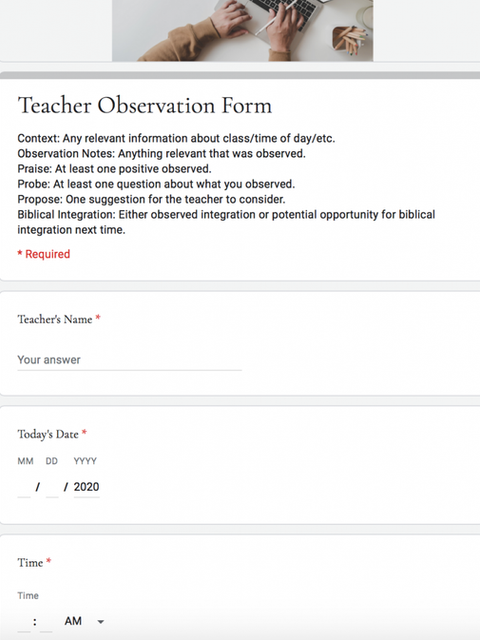


Every time you complete the form, your notes are automatically sent to a spreadsheet. Initially, everything will be a bit jumbled as the teachers’ information is added in the order you complete the form. But, with a few formulas, you can tell that information where to go so that you can easily view it teacher by teacher with a tab for each.

With another formula, you can export the information for each teacher into its own new sheet. That way, you can share the notes with a teacher confidentially. When it comes time to write an evaluation, all your notes are in one document, and there are no surprises for anyone!

Consolidate Faculty Meeting Notes
Another way Google Forms can make life easier is by capturing faculty meeting notes.

Again, the information is spit out into a Google Sheet. This time, you can organize the information by month. Simply click on a month’s tab, and all the meeting notes are there. You can include whatever categories you’d like, such as meeting notes, action items, and prayer requests. Export this information to a new document that is shared with teachers, and you can know that your notes are secure and no “oops-es” will happen. Just be sure to make it "view only" for anyone with whom you share it.

Record PLC Notes for Accountability and Growth
If PLCs (Professional Learning Communities) are part of your school’s professional development plan, Google Forms can be a great way to capture the important work that takes place there for future reference and accountability.
Create a form that encompasses the various elements of your PLCs so that information is broken into appropriate categories. You can make certain portions of the form required while others are optional so that one form can serve multiple purposes depending on the focus of your PLCs.


The information again goes to one large Google Sheet that you can use to see what’s happening in all of your groups. Use a formula to export it to a sheet specific to each individual group so they can access their notes, action items, and other data.

Sounds Good but Not Sure How to Start?
I've already done the work for you! I’ve created templates for each of the above scenarios that you can purchase individually at my Teachers Pay Teachers Store. Or, buy all three as a bundle for only $6. I’ve included easy-to-follow directions to make the sheets your own in just a few steps, and I’m here to help if you get stuck. My goal is to be a blessing to you while you bless your teachers and students, and as always, to take away some of the leg work for you so you can do the more important things.
Stay Connected!
Follow me on Facebook and join our collaboration group!


Comments